
01 / Source / Oscillators
Build the voice at the source.
Start with one Wave Factory oscillator, expand to six per group, and layer up to three independently shaped groups.
Wave Factory
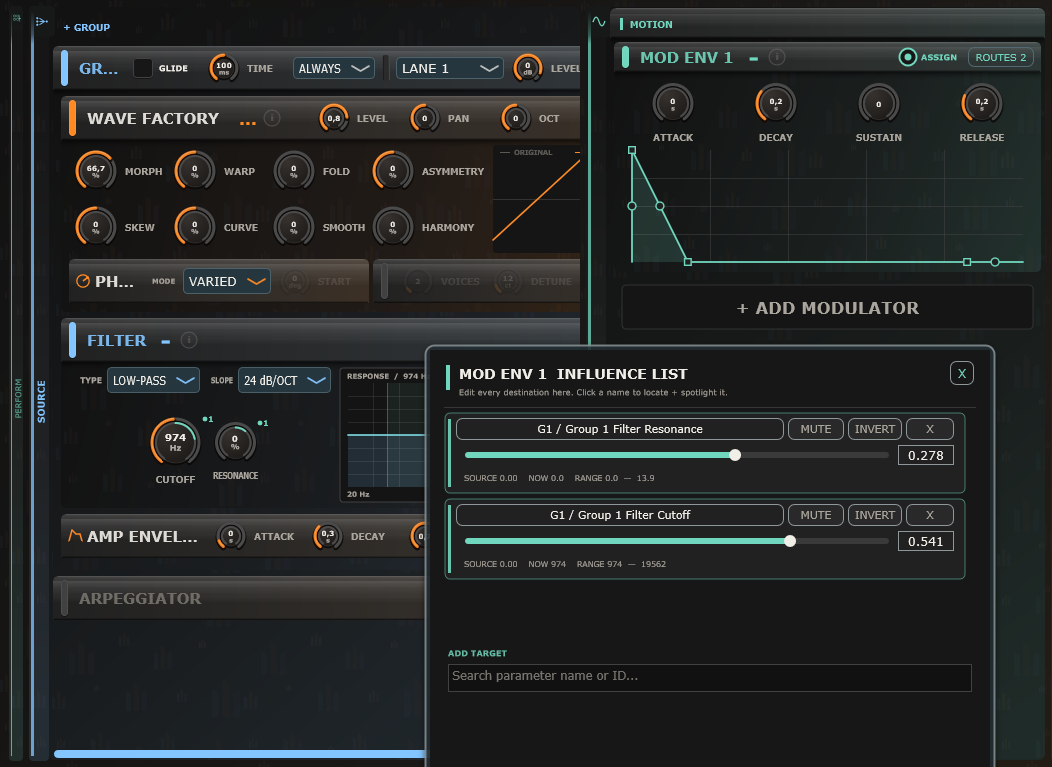
Morph continuously from Sine through Triangle and Saw to Square. Shape the result with Warp, Fold, Asymmetry, Skew / Width, Curve, Smooth / Edge, and Harmonics while comparing the original and modified waveforms live.
Harmonic Cloud
Choose Classic, Shimmer, Hollow, Steel, or Vintage character, then shape Voices, Detune, stereo Spread, Focus, Drift, and Tone. The voice profile and stereo-width display follow live modulation.
Noise
Choose White or Pink noise directly from the preview, then shape its spectral balance with Color and its activity with Density. Watch the resulting texture in the live display.
Wavetable
Browse 32 built-in tables across eight categories. Scan their frames with Position, reshape the waveform with Warp, and use Phase and Unison to make the result precise or expansive.
Sample / Chop
Import WAV, AIFF, FLAC, or OGG for One Shot, Loop, Ping Pong, Slice, or Granular playback. Use grid, transient, or manual slicing and edit pitch, level, pan, probability, and ratchets per slice. Keep Length preserves phrase timing as you play different notes with Keytrack enabled.
Piano
Play the built-in Electric and Felt models immediately, or download or locate the optional Salamander Grand Piano bank from the oscillator. Shape the response with Tone, Decay, and Touch, plus the shared tuning, level, and pan controls.
Sample Harmony
Add three scale-aware harmony voices with individual toggles, intervals, and levels. Balance them with Original and Blend, widen with Spread, and shape the grains with Texture. Choose a local Key and Scale or follow the arpeggiator scale.
Sample Formant
Preserve vocal character during pitch changes or shift its resonances by up to ±12 semitones. Formant processes conventional sample playback and Harmony voices; in Granular mode it applies to Harmony only.
Group Filter
Shape the combined group with low-pass, high-pass, band-pass, notch, Formant, Comb, or Ladder filtering at 12 or 24 dB/oct. Adjust Cutoff and Resonance directly on the interactive response graph.
Trance Gate
Give each group its own rhythmic gate with up to 32 steps, On / Off / Tie states, and editable step levels. Sync the pattern and shape each pulse with Depth, Attack, and Release.
- Group strip
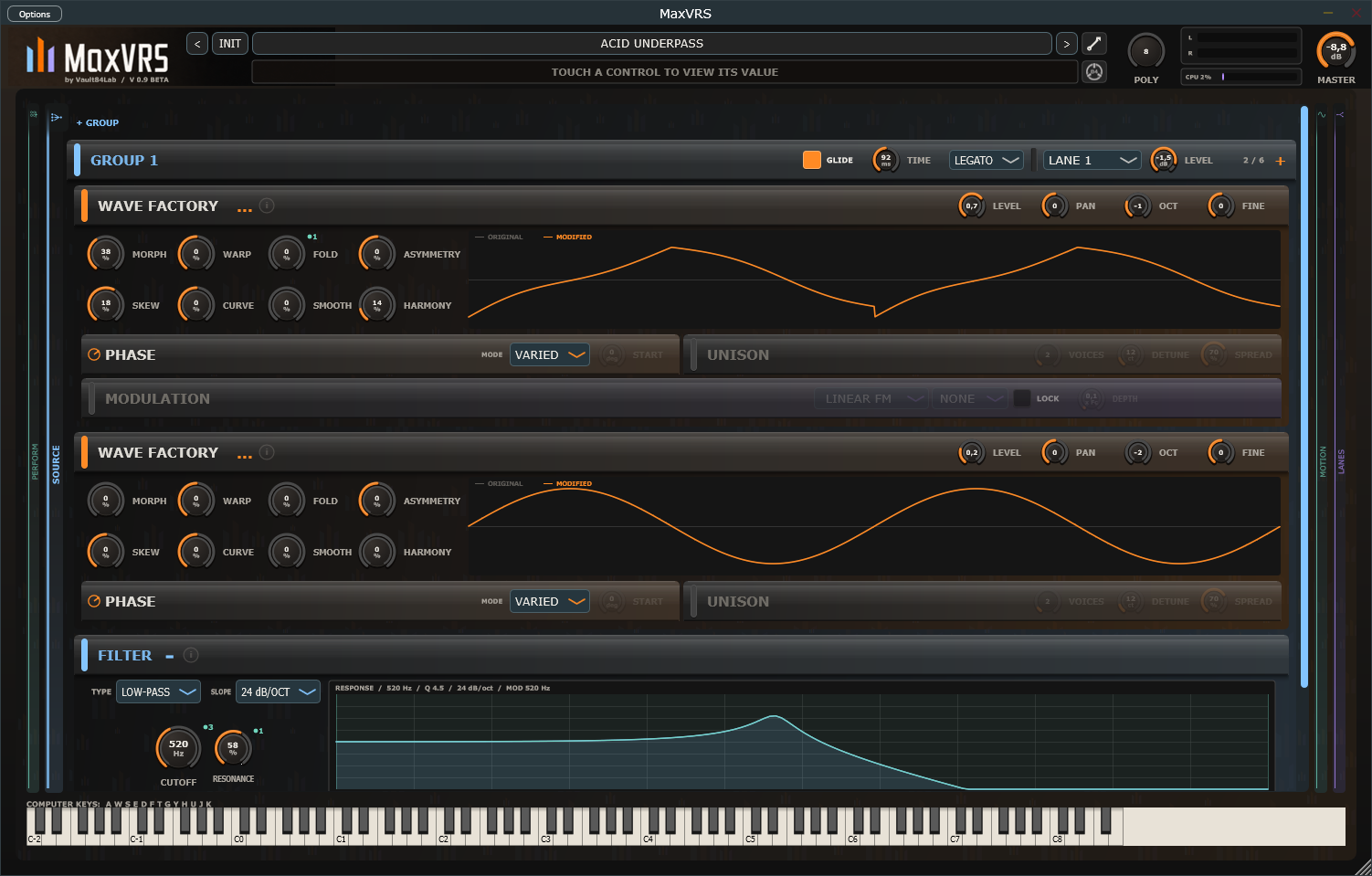
- Glide enable and time, Legato behaviour, lane destination, group level, oscillator count, and the add-source control live together above the stack.
- Source engines
- Choose Wave Factory, Harmonic Cloud, Noise, Wavetable, Sample / Chop, or Piano for each oscillator slot. Click a source preview to browse its waves, tables, or sound styles. Every edition plays presets made with the Pro engines.
- Oscillator header
- The colour stripe handles enable, mute, and solo. The header also exposes actions, help, Level, Pan, Octave, and Fine tuning.
- Wave Factory
- Morph continuously through Sine, Triangle, Saw, and Square, then shape the result with Warp, Fold, Asymmetry, Skew or Width, Curve, Smooth or Edge, and Harmonics.
- Harmonic Cloud
- Build a dense bank of partials with Voices, Detune, and stereo Spread, then focus its spectrum and introduce organic movement with Drift and Tone.
- Live waveform
- The graph compares the computed source with the modified signal, so shaping and incoming modulation remain visible while you play.
- Phase
- For periodic sources, Varied uses Phase Spread to control how far starting phases differ. Fixed restarts each note at the selected Start angle for repeatable attacks.
- Unison
- Stack supported Wave Factory, Wavetable, Sample / Chop and, in Pro, FM Lab voices with Voices, Detune, and stereo Spread. Harmonic Cloud has its own voice controls.
- Oscillator modulation
- Route an oscillator into a later source using Linear FM, Exponential FM, Phase, AM, Ring Mod, Hard Sync, PWM, or Wavefold, with destination, lock, and depth controls. Polarity and Tone shape each route; Hard Sync adds Softness.
- Amp Envelope
- Shape each group independently with a curved ADSR editor, Raw or Smooth transient response, and a One Shot mode for percussion.
- Wind Articulation
- Add a filter Bite, pitch Scoop, and delayed Vibrato to a group. Set vibrato Rate and Delay for expressive attacks and sustained notes.
- Oscillator actions
- Duplicate, copy, paste, or save individual oscillator presets. Randomize Tone, Movement, or Everything Safe while preserving source selection, levels, routing, and sample structure.
- Preset library
- Search and browse Factory and User collections by category, inspect descriptions and named macros, and save complete .mvrs patches; Pro presets are marked PRO. Save individual sources as .mvrsosc presets, or return to a saved patch with Reset.
- Undo and Redo
- Step back through up to 100 changes of the whole patch: knobs, modulation routes, patterns, samples, and the oscillator and effect structure. ⌘Z / Ctrl+Z and ⇧⌘Z / Ctrl+Shift+Z.
- AI Sound Assistant
- Describe a sound or a change and the assistant builds or edits the patch, then renders and measures it before it answers. Uses your own Claude or ChatGPT subscription or API key; each request is one Undo step.
- Group filter
- Choose low-pass, high-pass, band-pass, notch, Formant, Comb, or Ladder. Formant shapes a vowel from A to U, Comb rings on the note like a string, and Ladder is a classic four-pole low-pass that self-oscillates and drives. Set 12 or 24 dB/oct slope, Cutoff, and Resonance against the live response graph.
- FM LabPRO
- Six-operator FM synthesis with the shared Unison controls, for bells, electric pianos, metallic leads, and deep basses.
- Drum modulesPRO
- Kick, Snare & Clap, and Hats & Metal engines with classic and modern models, shaped with Tune, Decay, Punch, Click, Drive, and Accent. DRUM ENV sets a one-shot envelope.
- FormantPRO
- A pulse train through five vowel formants for voices, choirs, talking basses, and croaks, with Vowel, Size, Breath, and Jitter.
- ResonatorPRO
- Physical models: plucked and bowed strings, tubes, and modal bodies from wood and bars to bells, glass, plates, and skins. PLUCK ENV lets each note ring down.
- GrainsPRO
- A cloud of short grains from a wavetable, a sample, or Live: the last second of what earlier oscillators play. Size, Density, Spray, Pitch Spray, Reverse, Scan, and Freeze.
- ExcitePRO
- Let any oscillator play a Resonator in place of its own pluck or bow, or feed Live Grains: noise bows a string, a formant becomes a talking drum.