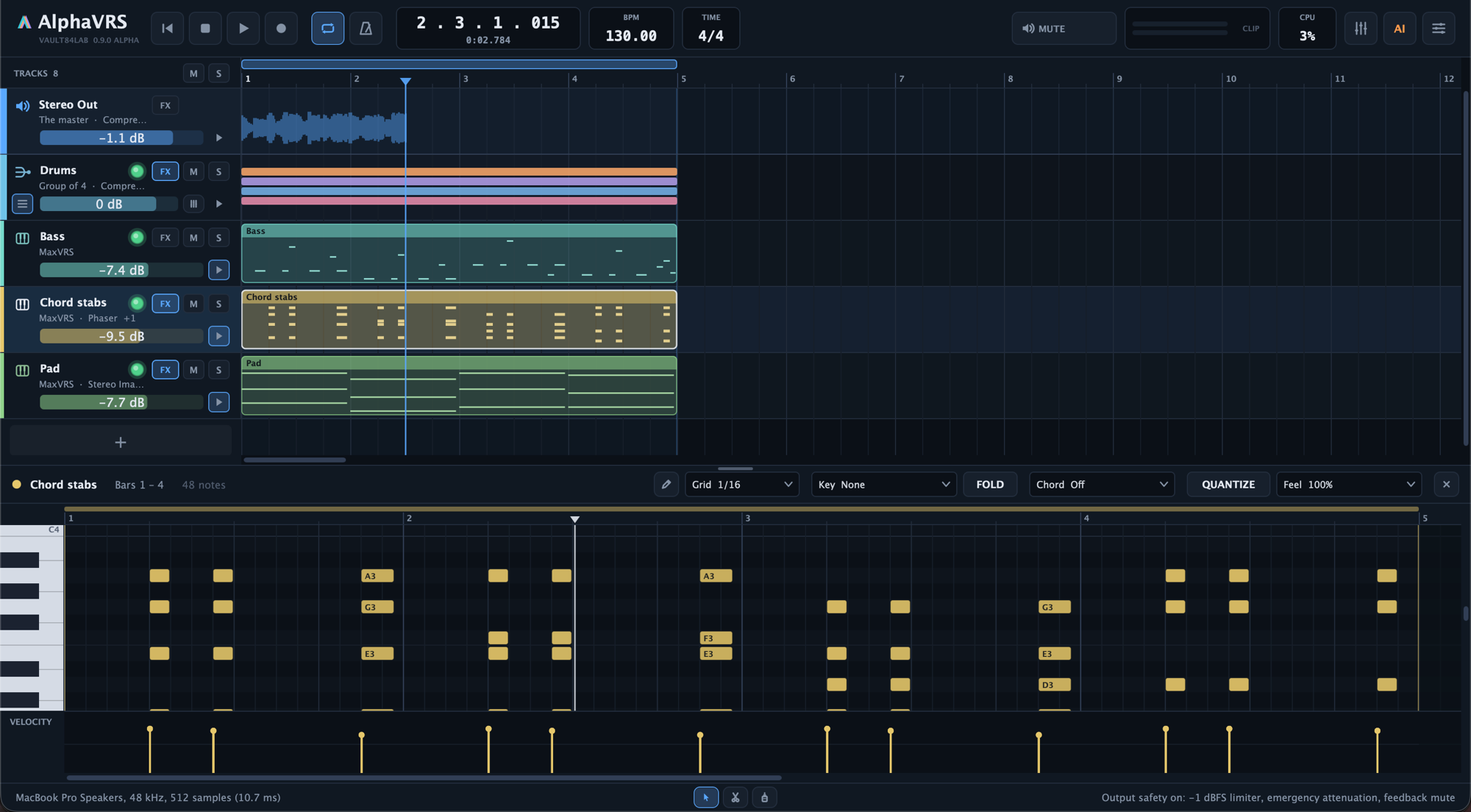
A focused DAW built around the VRS instruments: audio, MIDI, instrument and group tracks, MaxVRS and your own plug-ins, twenty-one VRS effects built in, a mastering window, and an AI assistant that arranges, mixes and masters with you.
From the first chord to the finished master: arrange, write, edit, mix, master and ask for help without leaving AlphaVRS.
01 / Arrange
Every idea gets a track.
Audio, MIDI, instrument and group tracks on one timeline, with clips you move, split and glue, and a project that keeps every plug-in exactly as you left it.
Instrument tracks
Play MaxVRS or any VST3 or AU instrument from your MIDI keyboard. Its window opens at the size you left it, and its sound is saved with the project.
Audio tracks
Mono or stereo, with recording: arm a track, choose its input, and every take lands as a 24-bit WAV beside the project, shifted by the device latency.
MIDI tracks
Send notes to any instrument track on a channel of your choice, so one instrument can play several parts.
Group tracks
Drag tracks onto a group to mix them as one: its own inserts, fader and pan. Collapse it to hide its tracks, see their clips in its lane, and open its own mixer.
Clips
Move, copy, resize, split and glue. Select with a rectangle and move, copy, delete or paste many clips together; cut, copy and paste land at the playhead.
Markers and loops
Name the song’s sections, loop any range, and work on a few bars with a focus loop beneath it, without moving the loop. A sample-accurate metronome, the tempo and the time signature keep time.
MIDI files
Drop MIDI files on the arrangement, from the Finder or straight from MaxVRS’s Chord Lab.
Tracks on and off
Switch a track off and it plays nothing while its plug-ins do no work: the quickest way to find what a project spends its CPU on.
02 / Notes
A piano roll that knows the key.
Write parts with the scale lit under your notes, chords drawn in a click, and feel you can dial in rather than fight.
Key and scale
Choose a key and the rows of its scale light up. Snap notes to it, move them by its steps, or fold the roll to the key’s notes only.
Chords
Draw a chord in a click, in the key or chosen yourself, with voicings and inversions: the chord theory of MaxVRS’s Chord Lab.
Feel
Quantize with a strength and swing, then humanize, make notes legato or set their length, all on the selection.
Arpeggiate and strum
Turn the selected chords into arpeggios, or strum them like a guitar.
Velocity
Shape the dynamics in the velocity lane under the notes, one note or a whole run at a time.
Chord names
The editor names the chord you have selected, so you always know what you are playing.
03 / Audio
Edit audio without touching the file.
Every edit plays live and stays undoable; your recordings on disk are never changed until you ask for a new file.
The audio editor
Select part of a take, then delete, silence, insert silence, reverse, invert, trim, set its gain or normalize it. Cut, copy and paste between clips.
Fades and crossfades
Fade in and out in three shapes, and overlap two clips to crossfade them.
Apply
When an edit is final, write it into a new file in one undoable step.
Audio at any rate
Import audio at any sample rate. OPTIMISE converts a file to the project’s rate in one undoable click, and the original stays.
Render to audio track
Print a track, its instrument and effects, into an audio track under it, and switch the original off.
04 / Mix
The VRS effects, built in.
Twenty-one VRS effects sit beside your own plug-ins on every track, and the mixer shows the whole session at a glance.
Mixer
A strip per track with its insert rack, pan, fader and meter, and Stereo Out with its own inserts and the safety stage.
21 built-in effects
Compressor, Limiter, Noise Gate, De-esser, Multiband, EQ, Filter, Drive, Reverb, Delay, Stereo Delay, Shimmer, Doubler, Chorus, Stereo Imager, Tremolo, Phaser, Flanger and Bitcrusher, with the Master EQ and Master Limiter of AlphaVRS Pro.
Effect windows with graphs
The EQ draws its response over the live spectrum; the Compressor and Limiter show their levels, reduction and curve. Undo takes back each move of a control.
Loudness on the mixer
Stereo Out’s loudness, measured to EBU R 128, sits beside its strip against the destination you are aiming for.
Delay compensation
Plug-ins and effects that add latency stay in time: every track and group waits for the latest, and the ruler follows what you hear.
Your plug-ins
VST3 and AU instruments and effects, by category in the menus. The scan runs in a process of its own, so a plug-in that crashes while it is found cannot take AlphaVRS with it.
Automation
Draw Volume, Pan, any plug-in parameter, MIDI controllers, pitch bend and pressure as smooth curves under each track.
Export
One mix or a file per track, the whole song or the loop, as WAV (16, 24 or 32-bit) or MP3, at the rate you choose.
05 / Mastering
Finish the song here.
A window for the master: where it is going, what it measures before and after, and how it compares, all with AlphaVRS’s own effects.
Loudness targets
Aim for Spotify, Apple Music, YouTube, radio and TV or a dance master, each with its loudness and true-peak ceiling.
Genres
Thirteen genres, from Pop and Rock to Podcast and Audiobook, each with the loudness and tone of finished work to compare with.
Reference track
Load a finished file and see how far your master is from it in loudness, tone and width.
Measure
One render reads the mix before the chain and the master after it: loudness, true peak, tone, width, and each part of the song.
Compare
Hear the master, the mix before it and the reference at equal loudness, as the louder one always sounds better.
Master with AI
Choose what it may touch (EQ, stereo, glue, multiband, loudness) and the assistant masters, measures and goes again. Ask it for one change instead, or stop it at any time.
06 / AI Assistant
Describe it. AlphaVRS builds it.
Ask for a bass line that follows the pad, an arp an octave higher or a quieter verse, and the assistant edits the project while you watch.
Builds and edits
Tracks, routing, instruments, effects, clips, notes, automation and the mix, through AlphaVRS’s own tools. Every change is listed.
Works with MaxVRS
It loads MaxVRS presets and hands a sound to MaxVRS’s own assistant to design, then saves it as a preset.
Hears your sounds
It scans the instruments you have installed, listens to their presets and chooses by ear.
Measures the mix
It renders the song, measures every track and the master, makes its changes and measures again.
One undo per request
Undo takes back a whole request at once, however many changes it made.
Your own Claude or ChatGPT
It runs through your own Claude Code or Codex command-line tool, with your subscription or API key (not included). AlphaVRS itself makes no network request.
07 / Safety
Loud mistakes stay quiet.
Every sound AlphaVRS plays passes the same always-on safety stage as MaxVRS. No project, plug-in or setting can switch it off.
Output limiter
A linked −1 dBFS limiter on everything that reaches your speakers.
Emergency attenuation
Runaway levels drop by 30 dB at once and recover slowly, so a misbehaving plug-in cannot blast you.
Feedback mute
Likely acoustic feedback from a microphone mutes the output until you unmute it.
Safe exports
Every exported file passes a fresh safety stage of its own.
AlphaVRS 1.0
Try it now. Pricing soon.
Free to download, with 16 tracks and every tool. Pro’s pricing is coming soon. See what Pro adds.