VoxVRS hears your voice a moment before it plays it. Pitch correction, five harmony voices, characters and an effect lane per voice are in place when a word begins, instead of catching up after it.
Reading the pitch of a voice takes a few milliseconds of it, so a pitch processor always plays a little behind what it hears. VoxVRS spends that time looking ahead: by the time a word reaches you it already knows where the word starts, which note it is, and whether a sudden jump is a real leap or a moment’s misreading.
Your voice arrives on the right and plays at Playing now. Everything between has already been heard: the next word is found, its note chosen from the candidates, and the harmonies (a third and a fifth here) are set before it sounds.
5 ms
Every frame weighed
Every 5 ms the pitch tracker lists up to sixteen candidates for the note, each with its likelihood, rather than taking the first one that looks right.
30 ms
Decided by path
Each moment is decided 30 ms later (45 ms in Studio), along the most likely path through what followed it. A note misread an octave down for an instant loses to the note you sang, so it never reaches the harmonies.
34 ms
Words seen coming
After a pause VoxVRS sees the next word about 34 ms before it plays it (66 ms in Studio). The correction glides to its note, the harmonies are set, and Voice Attack ends where the word begins.
0 ms
No delay of its own
The look-ahead fits inside the processing delay VoxVRS already reports to your DAW, 64 ms in Live and 96 ms in Studio, so your vocal stays in time with the song.
Measured on real vocals
−27 → −8 dB
A harmony’s level in a word’s first 60 ms after a pause, against its settled level. The sung voice itself reads −8 dB there: the harmonies now arrive with the word.
27 → 0
Frames read an octave too low on a gritty male lead, before and after the path decoder.
99.9%
Of a girl’s lead read within a semitone of an independent pitch reader.
Inside VoxVRS
Every voice in one window.
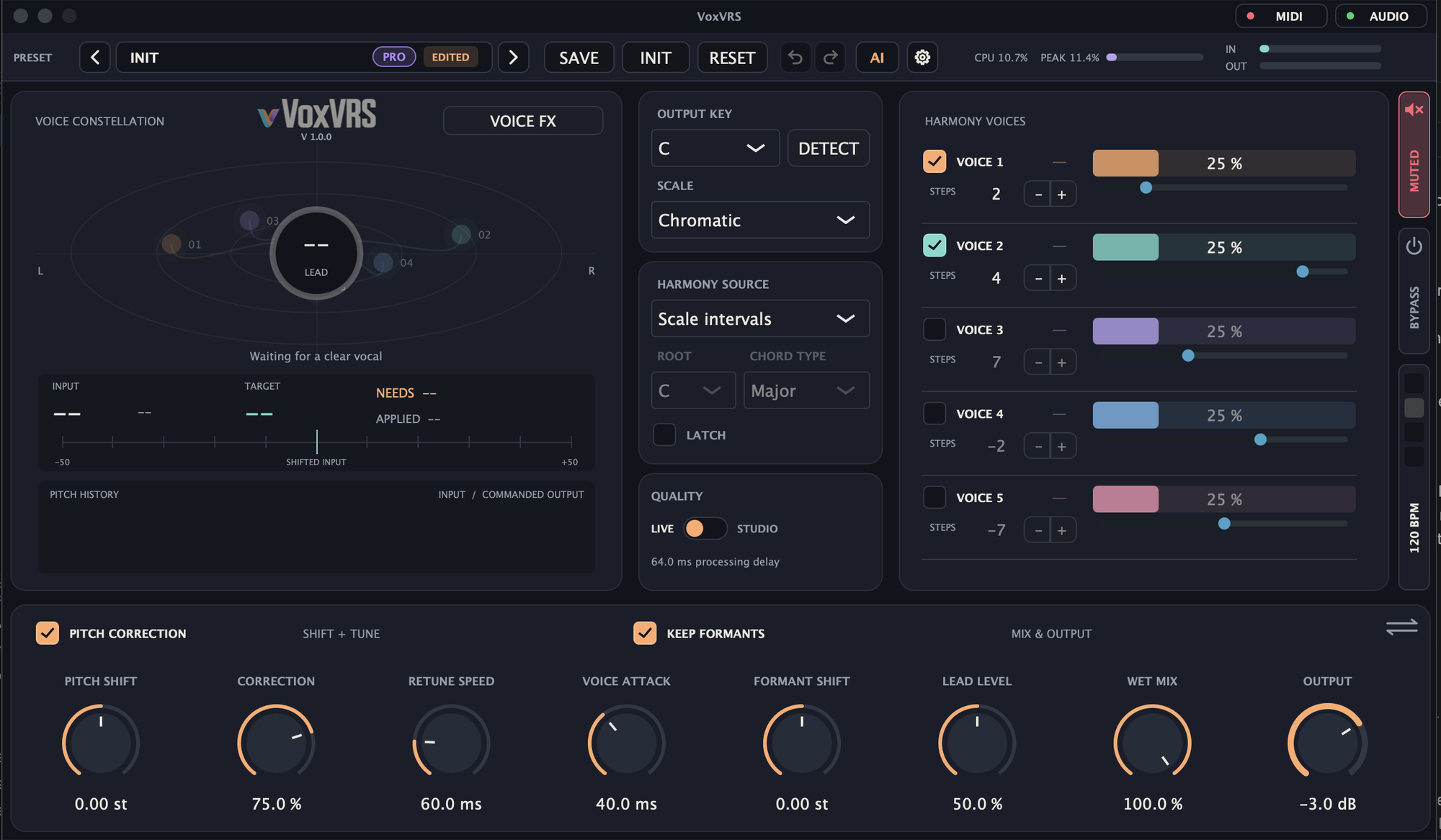
Correction, harmonies, characters, effects, modulation, presets and an assistant, around a constellation that shows where every voice is.
01 / Tune
In tune, in your key.
Set the song’s key, or sing a phrase and let VoxVRS find it, then choose how firmly the lead is pulled to its notes: from a light touch to the hard-tuned sound.
Key and scale
Choose the output key and scale; Chromatic accepts every semitone. Key and Scale are your song’s, so every preset you load keeps them.
DETECT
Sing a phrase and press DETECT: VoxVRS finds the key and scale of the last 8 seconds and says how sure it is, for example A minor · 82%. One Undo takes it back.
Pitch correction
Correction sets how far the lead is pulled to its target note, Retune Speed how fast: lower for the hard-tuned effect, higher for gentle movement.
Voice Attack
How gently processing enters at the start of a phrase, from 1 to 300 ms. Thanks to the look-ahead, the attack ends where the word begins.
Pitch Shift and formants
Transpose the voice in semitones without changing its length. Keep Formants preserves its character; Formant Shift changes it.
A tuner that explains itself
The note you sing and its cents, the target note, what the voice needs and what is applied, on a guitar-tuner gauge.
Pitch History
Your input and the commanded output drawn over time, so you can see what the correction did.
02 / Harmony
Five voices that follow you.
Up to five harmony voices beside the lead, each counting its steps in your song’s scale, so a third stays a third whatever note you sing.
Five harmony voices
Each with its own switch, scale steps, level and pan. In a major scale +2 steps is a third and +4 a fifth; in Chromatic, steps are semitones.
Notes you can read
Every voice shows the note it sings, such as E4, steady through your vibrato.
Scale intervals
The harmonies follow your melody through the chosen scale.
Manual chord
Choose a root and a chord type and the harmonies sing its notes, while the lead is still corrected to the scale and its passing notes stay.
MIDI chord
Play chords on a keyboard and the harmonies take their notes, with sustain, and Latch to hold a chord after you let go.
Voice constellation
Every voice as a star around the lead: its pitch up and down, its pan left and right, its level as brightness.
A balanced start
New sounds start with the lead at 50% and each harmony at 25%, so the harmonies sit beside the lead without raising the output.
03 / Voice FX
An effect lane for every voice.
Open VOICE FX and the lead and each harmony have a character and an effect lane of their own, with a MIX lane for all of them once they are mixed.
A lane per voice
Up to four effects on the lead and on each harmony, and up to eight on MIX. Add, switch, drag to reorder, remove.
25 effects
In seven groups: Dynamics, Tone, Space, Width and Thickness, Movement, Lo-fi and Machine Voice, from Compressor, De-esser and EQ to Shimmer, Doubler, Stereo Imager and Bitcrusher.
Live displays
The EQ draws over the live spectrum with points to drag; the Compressor, Bitcrusher, Shimmer and Stereo Imager show what they do as you sing.
Every control, when you want it
Click a tile for its card with every control. Advanced reveals the rest, and Sync sets a time or rate as a note division of the tempo.
Width from one microphone
Stereoize and Width spread a mono vocal across the stereo field, and Bass Mono keeps its low end in the centre.
The family’s effects
Resonator, Tape, Grain Delay and Beat Repeat from MaxVRS, and the Multiband Compressor from AlphaVRS, with the same controls and starting values.
Stutters on the word
Beat Repeat’s Sync Word starts a stutter at every word you sing; Host follows your DAW’s beat instead.
04 / Characters
Make the voice something else.
Give any voice a character, or put a machine in its lane: robots, monsters, a vocoder choir, a talkbox, or your own voice rebuilt. They are VoxVRS Pro, and every copy plays them.
Robot
Re-sings the voice as a machine on its note while keeping the words, in four types: Vocoder, Speech, Android and Spectral, with Tone, Glide and a control of each type’s own.
Monster
Up to an octave down with deeper formants, Growl for grit, Size for how big, and a Sub an octave below that follows you.
Transform
Your own voice resynthesised with its parts changed apart: Pitch, Formant, Breath, Whisper, Flat for a clean robot of your own voice, and Age.
Vocoder
A synth sings your words, on the pitch you sing or the notes you hold on a MIDI keyboard, with Bands, Formant, Sibilance, Octave and a Saw, Pulse or Supersaw.
Talkbox
The synth shaped by your mouth, as a real talkbox is: more vocal and funky than the Vocoder, with Sibilance to let your consonants through.
Ring Mod
The classic sci-fi machine: 30 Hz with a sine is the buzzing robot of old television, and Follow Voice keeps it in tune with you.
Compare at a click
A character’s checkbox bypasses it with a fade, and switching between Robot types crossfades while the track plays.
05 / Macros and Motion
Make it move.
Four macros and the mod wheel for your hands and your DAW, and a Motion rack that moves any control by itself, in time with your singing.
Macros
Macro 1 to 4 are the controls your DAW sees: automate them there. Every factory preset names what its four do, such as Space, Echo, Tune or Growl.
MOD wheel
Follows your keyboard’s mod wheel, or drag it on screen.
Motion rack
Envelopes, LFOs, Step Mods, Random and MSEG, up to four of each, every one a tile with its live graph.
Moves with your voice
Envelopes restart at each word you sing after a pause and at each MIDI note; LFOs, Step Mods and MSEGs can restart there too. Sync follows the DAW’s tempo.
Drag to route
Drag a source’s socket onto any knob: the main controls, harmony levels, pans and steps, the characters and every effect control.
Route Lens
Every route of a source in one list, with its amount, mute and invert. Click a name and VoxVRS opens the control and lights it up.
06 / Presets
Fifty-seven voices to start from.
Factory presets in seven categories, each a complete chain that keeps your song’s key, with four named macros that change the sound clearly.
Seven categories
Natural, Hard Tune, Harmony, Doubles & Width, Creative FX, Character and Songs: whole chains for a Pop Chorus, a Trap Hook, a Ballad or a Dance Drop.
Approved by ear
Every factory preset is level-matched, validated, and approved by listening.
Presets that move
Twelve move by themselves: LFOs sweep a filter or the width, Envelopes swell the choir at each sung word, Step Mods throw echoes in time.
PRO marks
A sound that uses Pro shows a purple PRO pill, in the library and beside its name.
Your own library
Save your sounds with a category, tags and a description, and share them as .vvrs files.
Undo and Redo
Up to 100 steps for every control, effect and character, and EDITED shows when the sound differs from its preset.
07 / AI Assistant
Describe the voice. VoxVRS builds it.
Ask for “tighter correction like a modern pop lead” or “two harmonies, a third and a fifth above, quieter and wide”, and the AI Sound Assistant shapes the voice while you watch.
It can change everything
The controls, characters, Voice FX lanes, macros, the Motion rack and its routes. It loads a preset to start from and saves the result when you ask.
It listens to its work
It renders a voice through a copy of the sound, offline and out of your speakers: a built-in sung phrase, deliberately off pitch, or your last take.
Every change listed
Each adjustment is listed with the reason for it. A whole request is one Undo step, and REVERT ALL puts the voice back as it was.
Plan first
PLAN FIRST has it propose a numbered plan and wait for your go-ahead.
Works with AlphaVRS
On an AlphaVRS track, AlphaVRS’s own assistant can load VoxVRS presets and ask VoxVRS’s assistant to design the voice.
Your own Claude or ChatGPT
It runs through your own Claude Code or Codex command-line tool, with your subscription or API key (not included). VoxVRS itself makes no network request.
08 / Live and Studio
Live or Studio, always in time.
Two qualities with the same controls and voices, a VST3 and AU plug-in for your DAW, and an app of its own to sing straight into.
Live
A 64 ms processing delay, with a shorter analysis window for voices from about 65 Hz.
Studio
A 96 ms delay, with a longer window down to about 50 Hz and smoother interpolation.
Reported to your DAW
VoxVRS tells the host its delay, so the vocal stays in time with the song. A change of quality waits while the transport plays, then fades across.
VST3 and AU
An insert effect on a vocal track, listed under Vocals, with MIDI in for chords, the Vocoder and the Talkbox.
A standalone app
Choose your microphone and outputs in Audio & MIDI; a MIDI keyboard turns on by itself, and the app remembers your setup and your last sound.
Metronome
A pad per beat follows your DAW’s tempo and bar; in the app it counts 120 BPM, the tempo that synced effects use there.
CPU meter
MaxVRS’s processing-budget meter, so you can see what each voice and effect costs while you build the sound.
09 / Safety
Loud mistakes stay quiet.
VoxVRS shares MaxVRS’s always-on protection, after every voice and effect. No preset, automation or assistant can switch it off.
Starts muted
The standalone app starts with its output muted every time: unmute once your headphones are at a low level.
Output limiter
A linked −1 dBFS ceiling on everything VoxVRS plays; normal levels pass unchanged.
Emergency attenuation
Runaway levels and faulty audio drop by 30 dB at once and recover slowly.
Feedback guard
Likely acoustic feedback from a microphone mutes the output until you unmute it. It never turns the sound back on by itself.
VoxVRS 1.0.0
Sing into it. Pricing soon.
Free to download, with correction, five harmonies, Voice FX, Motion, the presets and the AI assistant. Pro’s pricing is coming soon. See what Pro adds.
 Get VoxVRS